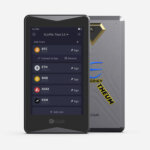
ELLIPAL Titan is a self-custody hardware wallet designed around an air-gapped signing model that uses QR codes instead of a wired data connection. The product is marketed for users who want private keys kept offline while managing assets such as Bitcoin, Ethereum, BNB, Solana, Tron, and Dogecoin through a companion mobile app. The current official product page describes the Titan 2.0 variant, which emphasizes clear on-device transaction review, a fully metal-sealed body, and offline transaction authorization.
Overview
Titan’s core design goal is to reduce remote-attack exposure by removing common connectivity pathways used by many wallets. ELLIPAL describes Titan 2.0 as having no WiFi, Bluetooth, USB, or network connectivity for transactions, and instead relies on scanning QR codes to transfer unsigned and signed transaction data between the mobile app and the device. Transactions are initiated in the ELLIPAL app and signed offline on the Titan, with the signed payload returned via QR code for broadcasting.
History and Background
ELLIPAL’s Titan line is positioned as an “air-gapped” hardware wallet series. Company materials describe Titan as part of ELLIPAL’s approach to reducing exposure to network-based attacks by keeping signing devices offline. The current storefront highlights Titan 2.0 as a newer generation model focused on usability and transaction clarity while retaining the air-gapped workflow.
Core Products and Services
- Titan 2.0 signs offline using a QR scanner. Its four-inch touchscreen displays transaction details for review.
- The ELLIPAL companion app runs on iOS and Android. It displays portfolios and prepares transactions, with connections to Web3 services.
- The product page lists support for 45+ blockchains, 50+ stablecoins, and 10,000+ tokens, with NFT support on Ethereum and Polygon.
- The ELLIPAL app lists swap functionality, buy and sell access through third-party providers, staking tools, and dApp connectivity through WalletConnect and MetaMask compatibility.
Technology and Features
ELLIPAL lists several security and usability features for Titan 2.0. The device uses QR-based signing and includes a large display intended to show transaction details clearly before approval, aligning with a “what you see is what you sign” approach. ELLIPAL also lists PIN and passphrase protections, including a gesture PIN and numeric password options, as well as a “secret secondary wallet” feature that can create a separate account protected by a different password.
On the hardware side, ELLIPAL describes a fully metal-sealed body intended to resist physical tampering and supply-chain style attacks. The product page also lists “PCI level self-destruction,” described as automatic deletion of private information if tampering is detected. Firmware upgrades are listed as being performed via MicroSD card.
- The Titan exchanges signing data through its QR scanner while remaining air-gapped.
- The device supports a 24-word seed phrase and an optional passphrase.
- ELLIPAL specifies a CC EAL5+ secure element.
- Firmware updates use a MicroSD card.
- The device has a fully sealed metal body.
Technical Specifications
- The display is 4.0-inch color IPS display.
- The device measures 118 × 66 × 9.7 mm.
- It weighs 140 g.
- It has a 1400 mAh battery.
- The companion app supports Android and iOS. MetaMask and WalletConnect provide dApp connectivity.
Use Cases and Market Position
ELLIPAL Titan is typically used for self-custody storage and for signing transactions while keeping the signing device offline. The air-gapped workflow can appeal to users who prefer to avoid Bluetooth or USB data connections during routine signing. Titan is also positioned for multi-chain users who want a single hardware wallet to manage tokens across multiple networks, while using a mobile app for daily interactions and dApp connectivity.
Risks and Considerations
- Security depends on protecting the recovery phrase and any passphrase. Loss can make funds unrecoverable, and exposure can enable theft.
- An offline signer reduces some attack surfaces, but users still need to verify addresses, amounts, and approvals on the device screen to avoid signing malicious requests.
- Updates are performed offline via MicroSD, and users should follow official upgrade guidance to reduce the risk of installing untrusted files.
- Swaps, buy and sell options, and staking features depend on external providers and can introduce additional fees, availability limits, and jurisdiction-based constraints.