Crypto Wallets
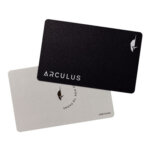
Arculus is a metal NFC signing card from CompoSecure’s business, whose parent trades on the NYSE as GPGI. The card needs no charging. Its phone app displays the transaction details because the card has no independent screen.
Partner links may earn CryptoSlate a commission.
Arculus combines a mobile app and a physical Key Card in a self-custody wallet. The product is designed to keep private keys offline on a secure element embedded in a metal card, while allowing users to manage assets and authorize transactions on an NFC-enabled smartphone. Arculus positions the wallet for users who want cold storage protections with a mobile-first experience for assets such as Bitcoin, Ethereum, and other supported networks and tokens.
Arculus uses a card-and-app model rather than a USB-connected hardware device. The Arculus app runs on iOS and Android and is used to view balances, initiate sends and receives, and access features such as swaps and fiat purchases where available. Signing a transaction requires the wallet PIN and an NFC tap of the Arculus Key Card. The app offers an optional biometric lock for access to the wallet.
Arculus was created by CompoSecure, a company known for manufacturing secure cards used in payments and identity applications. The Arculus wallet adapts that card-based security approach to digital assets by storing cryptographic keys inside a secure chip embedded in a metal card, with a companion application handling the user interface and blockchain interactions.
Arculus emphasizes “true cold storage” by keeping private keys on the card’s secure element rather than on the phone. Arculus markets a three-factor authentication model, but its biometric factor is optional. Users can enable fingerprint or Face ID authentication to open the app. Transaction signing requires the PIN and a card tap, whether or not the biometric app lock is enabled. The card is designed to be battery-free and does not use USB or Bluetooth, with NFC used for tap-to-authorize interactions.
From a hardware standpoint, Arculus describes its secure element as CC EAL6+ certified, and it states that private keys never leave the secure chip. The company also states the card can hold multiple accounts for different cryptocurrencies, and it references on-card memory capacity as a factor in how many keys can be stored. Arculus supports coins and tokens across multiple blockchains, including custom tokens on major EVM networks such as Ethereum, Polygon, and Binance Smart Chain.
Arculus is commonly positioned as an everyday-carry cold storage option for users who want hardware-backed signing without a dedicated USB device. Typical use cases include long-term self-custody of major assets, holding a multi-chain portfolio with a single mobile interface, and interacting with on-chain services through WalletConnect when needed. The card form factor can also appeal to users who prefer a minimalist setup and do not want to manage cables, batteries, or desktop-only software.
For users active on EVM ecosystems, Arculus may be used alongside networks such as Arbitrum, Optimism, and Base, depending on the wallet’s supported blockchains and token coverage at a given time. Arculus also supports in-app NFT management on compatible networks.
| Feature | Details (from Arculus official materials) |
|---|---|
| Cold storage with a Key Card | Private keys are generated, encrypted, and stored on a secure element embedded in a premium metal card, not stored online or saved on the phone. |
| Signing and optional app lock | Signing requires the user-created PIN and an NFC tap of the Arculus Card. Fingerprint or Face ID can be enabled as an optional lock for opening the app. |
| Mobile-first wallet experience | The Arculus app is used to buy, sell, swap, send, and receive supported crypto assets. The app is available on iOS and Android. |
| Web3 connectivity | Connects to DeFi platforms and Web3 apps using MetaMask workflows or WalletConnect. |
| NFT support | The app includes an NFT viewer and supports managing NFTs on supported networks. |
| Staking in-app | Supports both native staking and liquid staking for select assets (see “Staking support” table below). |
| Multi-card management | The app supports adding, removing, and switching between paired cards. Each Arculus Card can be paired with one wallet at a time. |
| Area | Specification | Details |
|---|---|---|
| Secure element | Hardware classification | CC EAL6+ Secure Element hardware classification. Private keys are designed not to leave the secure chip. |
| NFC security | Communication model | Uses encrypted, proprietary NFC communication with constantly changing keypairs. The NFC communication is described as not containing address or amount information. |
| PIN security | PIN length and handling | Wallet setup includes creating a 6-digit PIN. PIN attempts are tracked on-card. Repeated failed PIN attempts trigger a protective reset. |
| Recovery phrase | Backup and restore | Wallets can be restored with a 12-word or 24-word recovery phrase. Recovery words must be stored securely by the user. |
| Custody model | Self-custody | Arculus states it does not retain or store customers’ recovery phrases. |
| Firmware model (Key Card) | Update approach | The card ships locked, with code on the card not designed to be updated. |
| Category | Specification | Details |
|---|---|---|
| Form factor | Key Card | Premium metal card with an embedded NFC-enabled secure element. |
| Power | No charging required | The card needs no cords or charging and has no Bluetooth. The NFC card is designed to not run out of power. |
| Primary interface | NFC | Card-to-phone communication uses NFC. Official materials emphasize a short NFC range of only a few centimeters. |
| Card construction (official “How it works” document) | Component layers | Documented components include treated stainless steel, an NFC-enabled secure element, antenna inlay, PVC inlay, and a polymer protective layer. |
| Area | Specification | Details |
|---|---|---|
| Supported platforms | Mobile | iOS and Android. |
| Asset coverage | Blockchains and tokens | Official materials describe support for 20+ blockchains and thousands of tokens. The support center maintains an updated list of supported assets and networks. |
| Custom token support | Manual token addition | Custom tokens can be added on supported networks, including Ethereum, Arbitrum One, Avalanche C-Chain, Base, BNB Smart Chain, Optimism, Polygon, Solana, Tron, and others listed in the Arculus support center. |
| Swaps | Swap provider model | Swap fees are charged by Arculus’s liquidity partners. Changelly is one of its crypto-to-crypto swap providers. |
| Fiat on-ramp and off-ramp | Provider integrations | Buy and sell services use third-party liquidity partners, including OnRamper and Transak. MoneyGram cash-in and cash-out integration supports USDC on Stellar only. |
| Staking type | How it works | Examples of supported assets |
|---|---|---|
| Native staking | Classic staking flow that can include choosing a pool, unstaking, redelegating, and claiming rewards. The user does not receive a different token in return. | ADA, SOL, ATOM, CORE, DYDX, INJ, OSMO, SEI (SEIv1), TIA, POL on ETH (and other assets listed in the Arculus staking support article). |
| Liquid staking | Swaps a native token for a staked token representation, with protocol-defined unbonding and withdrawal mechanics. | stETH, rETH, sAVAX, sTRX (as listed in the Arculus staking support article). |
Profile claim requires a getarculus.com email address.
All images, branding and wording is copyright of Arculus Wallet. All content on this page is used for informational purposes only. This page may contain affiliate links that earn CryptoSlate a commission when readers click through and take action. CryptoSlate has no affiliation or relationship with the product mentioned on this page.
We use cookies to improve your experience on our site. By using our site, you consent to cookies.
Manage your cookie preferences below:
Essential cookies enable basic functions and are necessary for the proper function of the website.
CloudFlare provides web performance and security solutions, enhancing site speed and protecting against threats.
Service URL: developers.cloudflare.com (opens in a new window)
Google Analytics is a powerful tool that tracks and analyzes website traffic for informed marketing decisions.
Service URL: policies.google.com (opens in a new window)
Statistics cookies collect information anonymously. This information helps us understand how visitors use our website.
Clarity is a web analytics service that tracks and reports website traffic.
Service URL: clarity.microsoft.com (opens in a new window)
You can find more information in our Privacy Policy and .
The Shortlist
Weekly Newsletter
A considered selection of new crypto products, services, and reviews. See what each pick does, who it suits, and where it falls short.