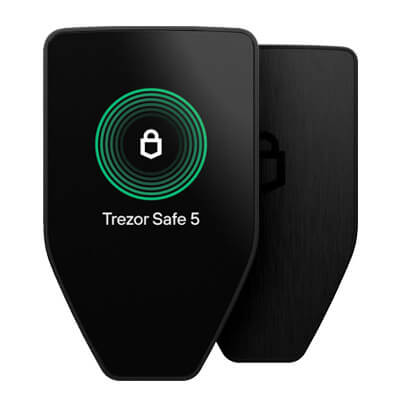
Trezor Safe 5 uses a 1.54-inch color touchscreen with haptic feedback for transaction confirmation. This self-custody model in Trezor’s Safe line keeps signing keys on the hardware, separate from the connected phone or computer. Individuals and organizations managing assets such as Bitcoin and Ethereum can check addresses and transaction details on the device before signing.
Overview
Trezor Safe 5 is built around the core hardware wallet model: private keys are generated and stored on the device, and transactions are signed on the device after the user confirms the details. This workflow aims to reduce exposure to common risks associated with software wallets, including malware on a computer, malicious browser extensions, or compromised mobile devices. The Safe 5 is typically used with Trezor’s companion software, Trezor Suite, which provides account management, transaction creation, and firmware update flows.
Core Products and Services
- Signing keys stay on the Safe 5, which requires user approval before signing a transaction.
- Trezor Suite provides balances, receiving addresses, and transaction preparation.
- Supported assets include major networks and Ethereum tokens, with coverage expanding through third-party wallet integrations depending on the asset.
- Safe 5 supports 12-, 20-, and 24-word wallet backups and Advanced Multi-share Backup for splitting recovery material across locations.
Technology and Features
The Safe 5 uses a touchscreen interface to help users review transaction details directly on the device. For hardware wallets, the ability to verify recipient addresses, amounts, and network context on the device screen is a central safety control, since it reduces reliance on what is displayed by the host computer or phone. A touchscreen can also improve usability for passphrase entry and confirmation workflows compared with two-button devices.
Trezor firmware is open source, allowing public inspection of its code. In practice, users still need to keep firmware up to date, confirm they are using official software builds, and follow secure setup procedures, especially when initializing a device for the first time or restoring from a backup.
Safe 5 is designed for everyday transaction signing, including receiving assets, sending assets, and interacting with tokens. For smart contract networks, users may encounter additional prompts such as token approvals and contract interactions. These transactions can carry more risk than simple transfers, so careful review on the device remains important.
Use Cases and Market Position
Trezor Safe 5 is often used as a primary self-custody device for users who want key isolation from a phone or computer, without moving to more complex operational setups. Common use cases include long-term storage of major assets, securing a portfolio across multiple accounts, and using a hardware signer for higher-risk activities such as swapping tokens or interacting with decentralized applications through compatible software interfaces.
Risks and Considerations
- Self-custody depends on the user securely storing recovery materials. If backups are lost, funds may be unrecoverable. If backups are exposed, funds can be stolen.
- A hardware wallet reduces key exposure, but it cannot prevent losses if a user approves a malicious transaction or signs an unsafe token approval.
- Some assets and advanced features may depend on third-party wallet integrations and may differ by network, token standard, or application support.
- Users should follow best practices for device sourcing, tamper checks, and initial setup to reduce the risk of pre-compromised hardware.